Who Reads Your Website: See Which AI Bots (ChatGPT, Perplexity...) Crawl Your Pages
Your site now has two kinds of readers: people and AI. Okidoki's admin shows both — site analytics for human visitors (even when they never open the chat) and AI crawler tracking that reveals which bots read which pages.
Okidoki Team
July 20, 2026·4 min read
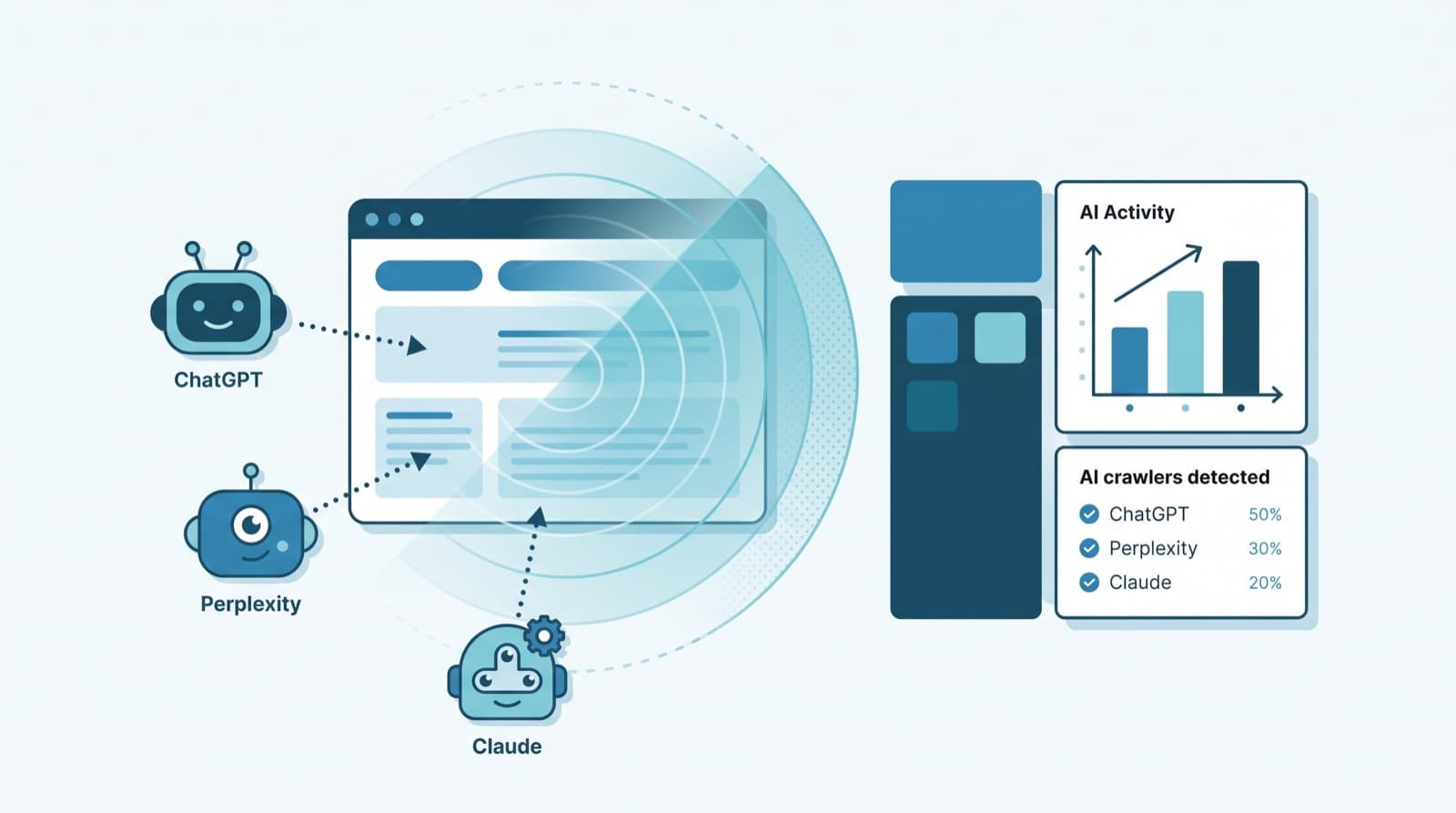
Your website has two kinds of readers now: people and AI. Classic analytics shows you the people. But when ChatGPT, Perplexity, or Claude read your pages to answer someone's question, they leave no trace in a normal analytics dashboard — and your chat widget never sees them either. Okidoki's admin closes both gaps: a Site analytics view for human visitors (even when they never open the chat) and AI crawler tracking that shows exactly which AI bots read which pages.
The blind spot: the readers you can't see
Two things hide AI crawlers from most teams. First, analytics tools are built around humans — sessions, clicks, scroll depth. Second, and more fundamentally, AI crawlers don't run JavaScript. They fetch your raw HTML and move on. That single fact has a big consequence: any tracker that relies on client-side JavaScript — including chat widgets — is invisible to them.
If an AI never crawls a page, that page can never be cited in an AI answer. Crawl gaps are citation gaps.
So the question "is ChatGPT actually reading my site?" can't be answered from the browser. It has to be answered on the server, where the raw request arrives. That's exactly where Okidoki now looks.
New in Okidoki #1: Site analytics without opening the chat
The dashboard's Site analytics section gives you a clean read on human traffic — no extra tag manager, no separate tool — scoped per app (site):
- Traffic KPIs — visits, unique visitors, page views, average session length, and bounce rate.
- Top pages — the URLs people actually land on and read.
- Top sections — where visitors spend their time on a page, not just which page.
- Devices and new vs returning — who is showing up and on what.
- Live visitors — who is on the site right now, in real time.
Crucially, this works even when a visitor never opens the chat — so you finally see the whole audience, not just the people who clicked the bubble.
New in Okidoki #2: See which AI bots read your pages
Right inside the same Site analytics view, per app, Okidoki now surfaces AI crawler activity: which bots visited, how many times, how many unique URLs they touched, when they were last seen, and your most-crawled pages. It's the answer to "is AI actually reading this?" — page by page.
Not all crawlers want the same thing, so Okidoki groups them by intent:
| Type | What it means | Examples |
|---|---|---|
| Training | Builds a training/index corpus for a model | GPTBot, ClaudeBot, Google-Extended, CCBot, Bytespider |
| Search | Powers an AI search index that can cite your page | OAI-SearchBot, PerplexityBot, Bingbot |
| Live (user) | Fetches your page live because a user asked | ChatGPT-User, Perplexity-User, Claude-User |
The "live user" group is the highest-intent signal of all: it means a real person asked an assistant something and the assistant went to your page to answer.
Why AI crawler visibility matters (AEO/GEO)
Search is shifting from a list of links to a direct answer. Answer Engine Optimization (AEO) — sometimes called Generative Engine Optimization (GEO) — is about being the source those answers are built from. And the first, non-negotiable step is simple:
- Being read is the prerequisite for being cited. If PerplexityBot never fetched your pricing page, Perplexity can't quote your pricing.
- Crawl coverage is measurable. Once you can see which pages bots reach — and which they never touch — you know where to improve links, structure, and content.
- It closes the loop with your content strategy. Pair it with pieces like our conversational AI cost statistics guide to see whether the pages you invest in are actually being picked up.
How Okidoki detects bots (the honest version)
We'll be direct about the mechanics, because it explains what you can and can't expect. Since AI crawlers don't execute JavaScript, the chat widget cannot detect them. Detection happens on the server, in two ways:
- Pages Okidoki hosts — if your site or landing page is served by Okidoki, crawler visits are detected automatically. Nothing to install.
- Your own website — install the Okidoki WordPress plugin (it has a "Track AI crawlers" toggle, on by default), or drop a small server-side snippet for other stacks. Both detect the crawler's User-Agent on the server and report the visit to Okidoki, keyed by your public key. See the developers page for the snippet.
It's lightweight and safe: detection is non-blocking, adds no measurable latency, and records the crawler and the path — not personal visitor data.
Where to find it
Open your Okidoki dashboard, go to Site analytics, pick the app (site) you want, and look for the AI crawlers panel below the traffic charts. Switch apps with the selector to compare sites.
Getting started
- Open Site analytics in your Okidoki dashboard and select your app.
- For Okidoki-hosted pages, you're already covered — data appears as crawlers arrive.
- For your own site, install/enable the Okidoki WordPress plugin (keep "Track AI crawlers" on), or add the server snippet from the developers page.
- Check back over the next days and weeks — crawlers visit on their own schedule.
Okidoki is an AI chat widget that qualifies website visitors and books meetings over text, voice, video, and WhatsApp — now with site analytics and AI crawler tracking built into the same dashboard.
Frequently asked questions
Can the Okidoki chat widget detect AI bots?+
No — and no client-side widget can. AI crawlers like GPTBot and PerplexityBot don't run JavaScript, so the widget script never loads for them. Okidoki detects them on the server instead: automatically on Okidoki-hosted pages, and via the WordPress plugin or a server snippet on your own site.
Which AI bots does Okidoki track?+
Okidoki recognizes the major AI crawlers, including GPTBot and ChatGPT-User (OpenAI), OAI-SearchBot, ClaudeBot and Claude-User (Anthropic), PerplexityBot and Perplexity-User, Google-Extended, Bingbot, CCBot (Common Crawl), Bytespider, Amazonbot, Applebot-Extended, Meta AI, DuckAssistBot, and Mistral — grouped by intent (training, search, or live user).
Do I need the WordPress plugin?+
For pages Okidoki hosts, no — tracking is automatic. To track AI crawlers on your own website, install the Okidoki WordPress plugin (its "Track AI crawlers" toggle is on by default) or add the small server-side snippet for non-WordPress stacks.
Will AI crawler tracking slow down my site?+
No. Detection runs on the server and the report is sent fire-and-forget (non-blocking), so it adds no measurable latency for visitors or bots. It only fires when a request is identified as a known AI crawler.
Does this collect visitors’ personal data?+
AI crawler tracking records the bot's User-Agent and the crawled path — not personal visitor data. The separate Site analytics view aggregates human traffic (visits, pages, devices) and excludes test traffic.
How is this different from Google Analytics?+
Google Analytics is JavaScript-based, so it misses AI crawlers entirely. Okidoki adds server-side AI crawler visibility and combines it with human site analytics in one per-app dashboard — so you see both audiences in the same place.
Why does it matter whether AI bots read my pages?+
Because being crawled is the prerequisite for being cited. If an AI engine never fetches a page, it can never quote or recommend it. Seeing which pages AI actually reads shows you where your AEO/GEO coverage is strong and where it has gaps.