Face-to-Face AI: Add Live Video Avatar Calls to Your Website
Most chat widgets are text boxes. Okidoki can also greet visitors on a real video call — a lifelike avatar that sees them, reacts, answers in real time, and books the meeting. Here's how the video channel works.
Okidoki Team
July 11, 2026·3 min read

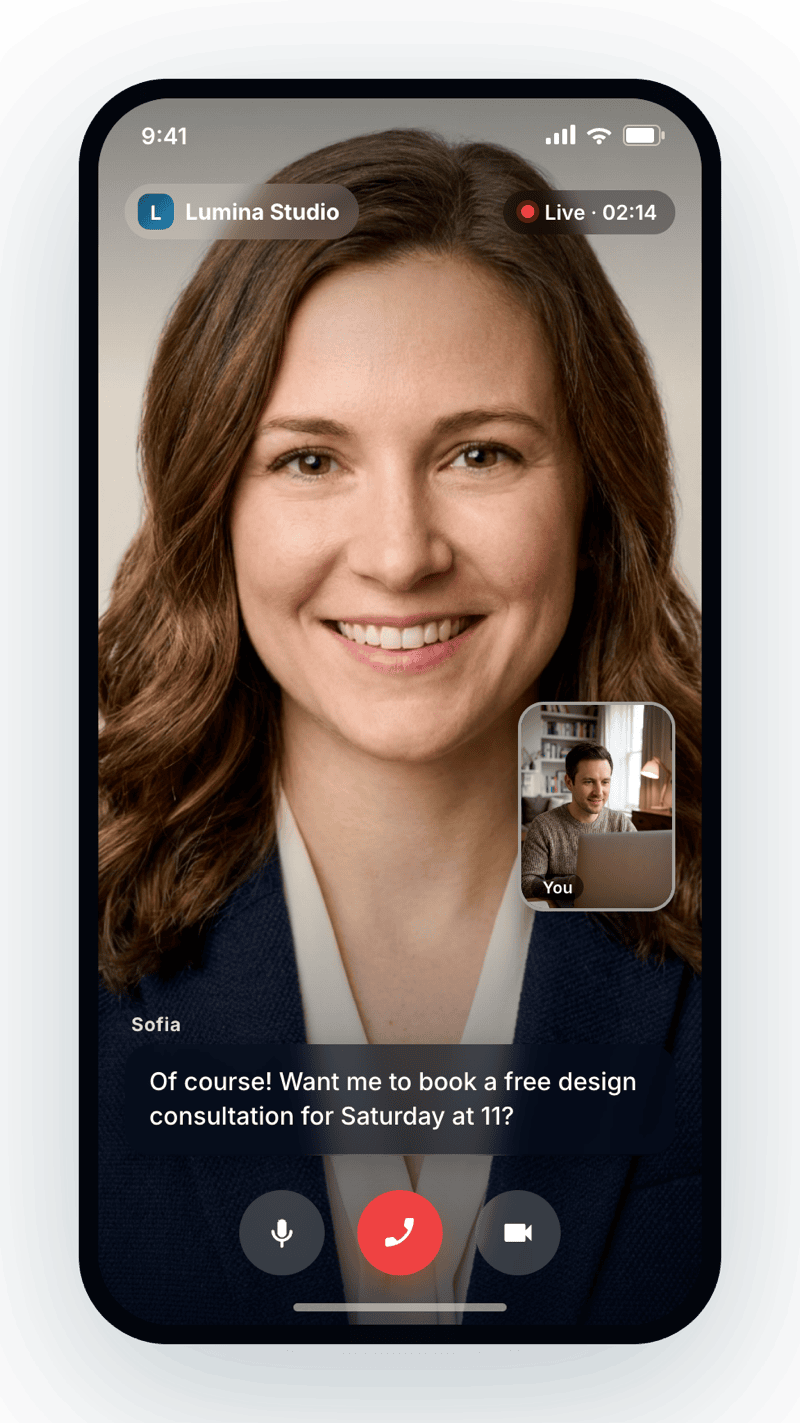
Most website chat widgets are a text box. Okidoki can go further and greet a visitor on a real, face-to-face video call — a lifelike AI avatar that appears on screen, sees the visitor through their camera (with their permission), reacts to their expressions, answers out loud in real time, and books the meeting before the call ends. It turns a passive "leave a message" moment into a genuine conversation, right on your page.
What is okidoki's video channel?
The video channel is a real-time, two-way video conversation between your visitor and an AI avatar. It's powered by Tavus, a conversational video platform, orchestrated over a low-latency Daily.co connection. Instead of typing, the visitor talks; instead of reading a canned reply, they watch a human-like avatar respond naturally — with the same knowledge and abilities as your text agent.
How a video call works
When a visitor starts a video conversation, okidoki opens a live session with the avatar. Because the camera is on (opt-in), the avatar can see and react to the visitor's expressions and emotions, making the exchange feel present rather than scripted. The visitor speaks, the AI listens, thinks, and answers in real time — turn by turn, like a video call with a well-briefed team member.
It's the same agent — now on camera
The avatar isn't a separate bot. It's the same okidoki agent you already configured, so everything it does in text it can do on video:
- Answer from your knowledge base — it searches your uploaded docs and website content to reply accurately.
- Book meetings live — it can check availability and schedule an appointment during the call.
- Run your page tools — the client-side tools you register still work, so the agent can navigate the page or trigger actions while talking. (See the developers page.)
Choose an avatar (or bring your own)
You can pick from 20+ lifelike avatars — different looks and voices — or bring your own Tavus replica to put a familiar face on your brand. The avatar speaks English and Spanish, so you can match your audience.
Three ways to offer video
You decide how prominent video should be:
- Text, voice and video in one widget — visitors chat as usual and can switch to a video call with a tap.
- Video-first — open the widget straight into a video conversation for a high-touch welcome.
- Premium / selective — reserve video for specific pages, campaigns, or qualified leads to keep it high-impact.
Availability and limits
The video channel is available on the Growth plan ($999/month), which includes 25 minutes of video conversation per month, and on Enterprise with higher limits. Individual calls are capped by default (about five minutes each) to keep the experience focused and costs predictable — plenty of time to answer a question and book a meeting.
How to turn it on
Enable video for your app in the dashboard, then trigger a video conversation from anywhere on your site:
// Open the widget directly in video mode
OkidokiWidget.openChat({ mode: 'video' });
That's it — the same embed script that powers your text chat now offers a face-to-face option.
Where to go next
For a deeper explainer, read what are AI video avatars, and see the full widget API on the okidoki developers page. Ready to try it live? Add the widget, enable video, and let your next visitor meet your brand face to face.
Frequently asked questions
What is an AI video avatar on a website?+
It's a real-time video conversation between your visitor and a lifelike AI presenter. With okidoki the avatar is powered by Tavus over a Daily.co connection: the visitor talks, the avatar sees them (camera opt-in), reacts to their expressions, and answers out loud — the same agent as your text chat, now face to face.
Can the video avatar book meetings and answer real questions?+
Yes. The video avatar is the same okidoki agent, so it can search your knowledge base to answer accurately, run the client-side tools you register, and schedule an appointment live during the call.
Which avatars and languages are available?+
You can choose from 20+ lifelike avatars, or bring your own Tavus replica to match your brand. The avatar speaks English and Spanish.
What does the video channel cost, and are there limits?+
Video is available on the Growth plan ($999/month), which includes 25 minutes of video conversation per month, and on Enterprise with higher limits. Individual calls are capped by default (about five minutes each) to keep costs predictable.